Company news
Less admin for your site team: tidier notes, faster search and forms that build themselves
- Published
- Reading time
- 4 min read
Construction is not broken, but it is clogged.
Every time a site manager goes hunting for a drawing. Every time a foreman squints at a messy docket, wondering what was written. Every time a project lead guesses their way through a variation clause.
That is wasted time, wasted money and lost momentum.
Spec sheets, dockets, site diaries and rushed notes bury construction teams in admin. Teams cannot skip it, because recording progress and process matters. But Australian civil sites move fast.
We saw room for a practical workaround: take the grunt work off your team without adding more systems or more admin. So we built a set of AI tools into Varicon. They are not meant to replace your team. Think of them as an extra set of hands doing the background admin, so your crew can get on with the actual construction. You can read the summary on our AI page.
Removing the friction that slows teams down
The biggest gains in construction do not always come from new machinery or materials. Sometimes they come from removing the friction that slows a team down.
Imagine if the forms you needed built themselves. If site photos and documents came up in seconds, even when the files are called IMG001.JPG because you were in a rush. If your rough site notes turned into clean, readable entries.
The aim is not to add another tool to your workflow. It is a quiet improvement to the platform your team already uses.
What is new
We rolled these features out during our AI Launch Week. They follow the same idea as the rest of Varicon: a fat-finger friendly tool built for civil.
They sit inside the platform, so you do not switch to another app in a rush just to write a note or find a file.
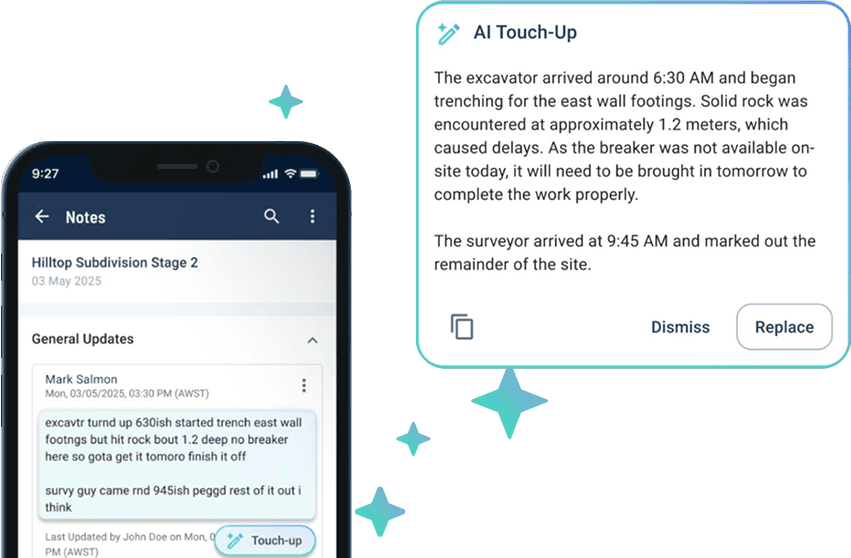
1. AI Touch-Up: rushed site notes, made readable
12-hour shifts, rushed dockets and half-readable diary notes. Most of us have been there.
AI Touch-Up takes quick, messy field notes and turns them into clear entries with one tap. It works on site diaries, dockets and timesheets, so nobody has to decode what you wrote at 5:45 pm last Tuesday.
It is still your words, just clearer.
2. Varicon Spotlight: search your project in plain English
Looking for a file, photo or record you are sure was there last week? Spotlight finds documents, settings and images from a plain-English search, such as “find the photo from last Friday with a broken pipe”.
3. Varicon Co-Pilot Docs: ask questions of your documents
Ever spent half an hour digging through RFIs, spec sheets and drawings to find one detail? Upload your files to Co-Pilot Docs and ask a question, such as “What’s the variation clause?” or “Summarise this contract”.
It also suggests questions that may matter to you, so you get clear answers from your own documents without the digging.
4. Smart Tags and Auto Rename: files you can find
Phone photos and PDF downloads come with names like IMG_0921.jpg or Doc-final-V2.pdf. A week later, nobody knows what is what.
Varicon reads what a file is about, renames it based on its contents and adds tags for search. Your records stay organised from the start, and files are quicker to find.
5. Custom Forms Builder: describe the form, get the form
No more dragging, dropping or hunting for templates. Describe the form you need in plain English, as if you were explaining it to a colleague, and Varicon builds a form ready to use. See how digital forms work in Varicon.
Why it matters on civil jobs
Accurate records matter on civil jobs. Projects involve clients and other outside parties, so paperwork is essential for variations, claims and resolving disputes. It is also one of the most time-consuming jobs for field teams.
Most construction teams do not ignore admin problems, they put them off. The thinking is: finish the job first, then fix the process. But when decisions are delayed, rework piles up, tracking slips and small errors become big oversights.
That is why these tools deal with the problem as it happens, not weeks later.
Is this just automation?
Automation handles repetitive, rule-based tasks: a notification, a standard report or a team reminder. These tools go a step further. They read your notes and documents, understand the context and help with one-off jobs, such as tidying a site note, building a form for a project or organising files.
Instead of only automating what you already do, they adapt to how you work and cut the time spent on admin.
Do smaller contractors benefit?
Yes. Smaller teams carry the same paperwork with fewer people, so time saved on admin counts for more. The tools are part of the platform, so there is no extra system to learn or juggle.
Try one this week
Here is a small step: try one of these tools on your next job. Use Co-Pilot Docs to review your next contract. Ask Spotlight to find that photo from three weeks ago. Let AI Touch-Up rewrite a messy note.
Whether you are a site manager, a project engineer or a commercial lead, the tools work for your team, not above it.
Book a demo to see them on your own jobs.